
Step 1 — Enable Gutter Quotes
Before configuring your products, you need to activate the Gutters feature on your account.
-
In your portal navigate to:
- In your portal, navigate to Products and open the Gutters Catalog.
- Click the Connect Gutters button and request your free trial.
- You will be notified as soon as Gutters has been activated on your account.
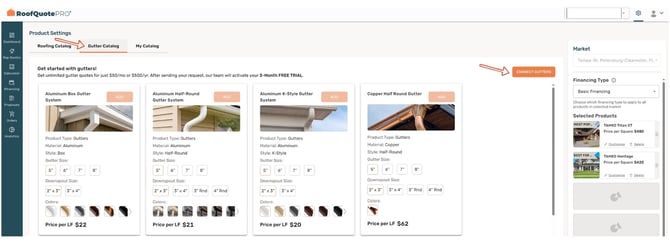
Once activated, you will see a new product selections tab for Gutters appear inside the Products section of your portal.
Step 2 — Select Your Gutter Products
With Gutters enabled, you can now choose the products you want to offer.
- Select up to 8 gutter and gutter guard products per market.
- Choose from a wide range of material options:
- Aluminum, Steel, Copper, Galvalume, and Vinyl
- Choose from styles including K-Style, Half-Round, and Box.
- If a product is not in the catalog, you can request it to be added — or build a fully custom product.
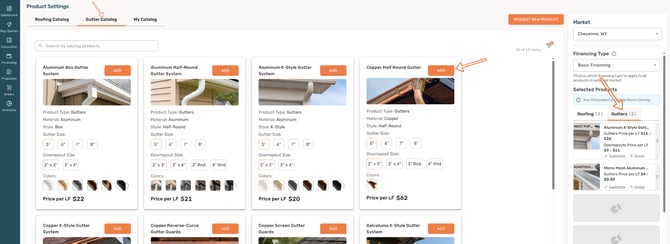
Sort your product selections in the order you want them to display in Rep Quotes. The order here determines the order your team sees.
Step 3 — Customize Each Product
Click Customize on any product to configure its name, appearance, pricing, and more.
Branding & Display
- Edit the product name to match how you present it to homeowners.
- Add a highlight label (e.g., "Most Popular" or "Best Value") to make a product stand out.
- Toggle financing availability on or off.
- Swap out product images, reorder colors, or hide color options you do not carry.
Pricing Variants
Gutter products include a powerful new pricing feature: Pricing Variants.
- Set a distinct price per linear foot for each gutter size you offer.
- Set a distinct price per linear foot for each downspout size you offer.
- Set pricing for each gutter guard option.
- Unselect any sizes or options you do not carry — they will be hidden from quotes.
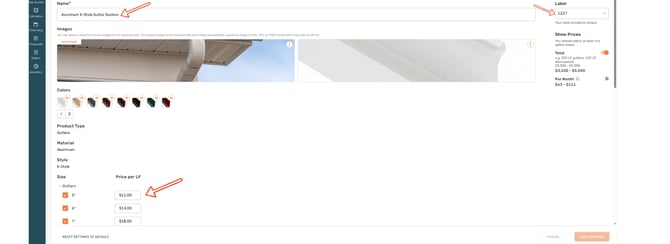
Calculation Formula for Gutter Quotes:
Quote Total = (Total LF of Gutters × Price/LF) + (Total LF of Downspouts × Price/LF)
Heads Up! Gutter products do not currently factor in waste or slope charges
Step 4 — Configure Your Markets
Repeat the product selection and customization process for each of your markets — or use the shortcut below to save time.
- Go to Markets in your portal.
- Select the market you have already configured.
- Use the Copy Product Settings option to apply those settings to your other markets.
Customize the warranty, top features, and package details or hide any of these sections entirely
(Optional) Add a custom button
Now do this for each of your products, and don’t forget to save your changes
Repeat the process for each of your markets
Or to shortcut that step, go to Markets, select the market you’ve set up and copy its product settings to your other markets
Congratulations! Gutters are now set up and ready for sales
Next → Learn How to Create and Send Gutter Quotes