
⚠ Before You Begin
Your team must complete the Gutter Products Setup before creating gutter quotes. Make sure your gutter catalog is configured and saved for each of your markets.
→ See the Setting Up Gutter Products article to get started.
Step 1 — Open Rep Quotes & Enter the Lead
Start by creating a new lead and generating your roofing quote as usual.
- Open Rep Quotes and enter the lead's property address.
- Confirm the roof structures to include and verify the slope values.
- Click Create Quote and enter the lead's contact details.
- Optional: Toggle off "Add lead to your dashboard" if you want to skip saving this lead.
- Generate the roofing quote, then switch to the
- Generate the roofing quote, then click the Gutters tab to begin adding gutter measurements.
.png?width=670&height=335&name=KB%20-%20GQP%20-%20quote%201%20(1).png)
Step 2 — Measure & Draw Gutters on the Map
You can enter measurements manually, or use the interactive map tool to trace gutter lines directly on the property.
Drawing Gutter Lines
- Click the Add Gutters button on the map to enter drawing mode.
- Click once on the map to start a new gutter line.
- Drag and click at each corner to trace along the roofline.
- When you reach the end of the gutter run, click the last point twice to complete the line.
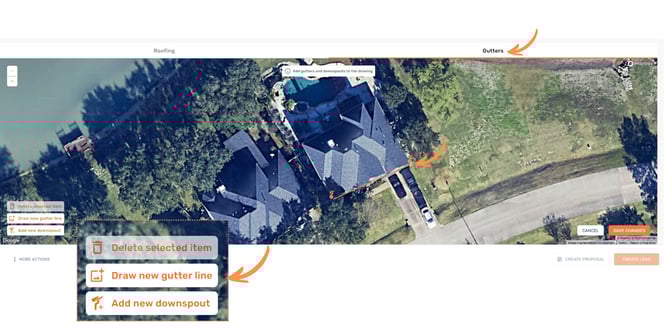
To adjust a line after drawing: click and drag any endpoint or corner. For midpoints, click twice first, then drag to reposition.
- Click Draw new gutter line to add another run.
- Repeat for each seamless gutter section on the property.
Adding Downspouts
- Click Add new downspout and drop a pin at each downspout location.
- Click Finish adding when all downspouts are placed.
- Click Save Changes to finalize your gutter drawing.
Finishing Touches
- Toggle Include Gutter Guards on any gutter line that should include guard coverage.
- Enter the linear footage for each downspout.
- Open the property in Street View if you need to verify height or confirm placement.
Step 3 — Build Your Gutter Quote
This is where Rep Quotes really shines. You can quickly assemble quotes for any combination of products, sizes, and colors — all tailored to the customer.
- Select a product, then choose a color and size variation to add it to your cart.
- Mix and match products to build exactly the right quote for each customer.
- When your cart is ready, click Email Details to send the quote.
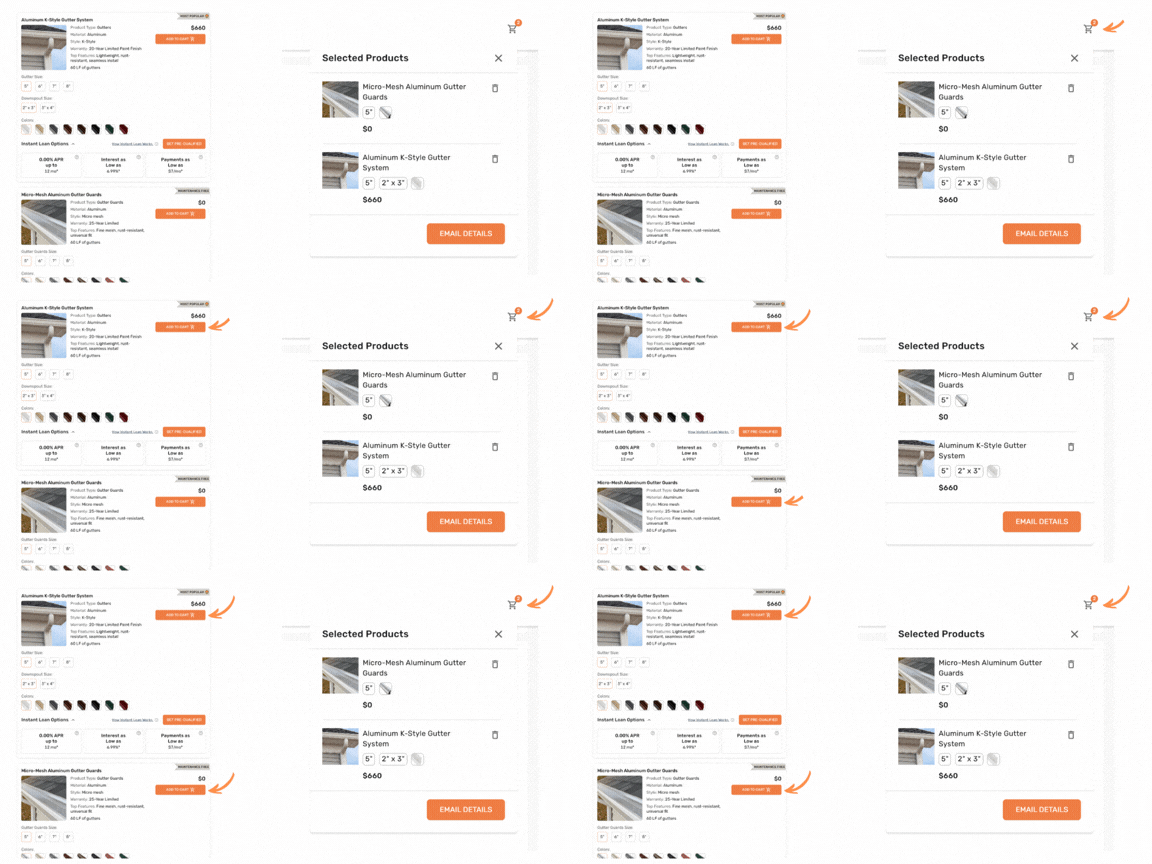
Use the cart to build multiple quote scenarios in a single email — then let the customer choose what works best for them.
Step 4 — Customize & Send the Quote
Every quote email is fully customizable before it goes out.
- Edit the subject line and message body to match your voice and brand.
- Adjust which product details appear in the email.
- Add attachments such as brochures, warranties, or financing info.
Quote Combinations You Can Send
The flexibility of Rep Quotes lets you create virtually any quoting scenario:
- A Good / Better / Best tiered quote
- A roofing + gutters + guards combo package
- Side-by-side color comparisons for the same product
- Upgrade options with custom additional costs
- Any other combination your sales process calls for
Every quote you send is automatically recorded in the lead's dashboard, along with the gutter measurements used to generate it. Nothing gets lost.
You're Ready to Quote Gutters!
Your team is now fully equipped to measure, build, and send professional gutter quotes — all without leaving Rep Quotes. The more you use the map drawing tool, the faster and more accurate your quotes will become.