Requirements
- Roof Quote PRO™ active subscription
- At least one additional user added to your account. See How to Add Users for steps.
Overview
Deeplinks allow you to append a sales rep's unique identifier to the URL where your RoofQuote PRO widget is installed. When a homeowner submits their information through that link, the lead is automatically assigned to the corresponding rep. This works with shared links, QR codes, marketing campaigns, and more.
NOTE: The rep parameter is also passed along to any connected integrations via native integrations or webhooks.
Table of Contents
Build Your Deeplink
- Identify the URL where your RoofQuote PRO widget is embedded or installed. This is the base link you'll use to build your deeplink. For example:
https://offers.roofle.com/rqp/demo - Log in to your PRO portal.
- Go to Account > My Profile.
- Look for the section labeled My Public Link.
- Copy the rep string that appears (e.g.,
?rep=emailaddress).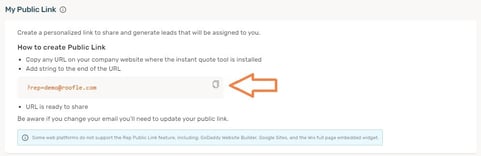
- Append the rep string to the end of your widget URL. For example:
https://offers.roofle.com/rqp/demo?rep=emailaddress
IMPORTANT: The email address in the rep parameter must match the user's login email on RoofQuote PRO.
PRO TIP: Repeat this process for each sales rep on your team by simply replacing the email address in the rep parameter with that user's RoofQuote PRO login email. Each rep gets their own unique deeplink.
How to Use It
Once your deeplink is built, you can use it anywhere you'd share your quote tool:
- Share it directly with prospects
- Generate a QR code for door hangers, yard signs, truck wraps, or business cards
- Use it in email campaigns or paid ads with unique links per rep
Whenever a lead enters their information through a deeplinked page, they will be automatically tagged with the corresponding sales rep.