Requirements:
- Roof Quote PRO™ active subscription
- Admin, Production Rep, or Sales Rep user access
Overview:
Using this process while in Rep Quotes allows you to turn off lead capture and generate an instant roof quote for any address without entering contact information or triggering any email notifications. This is useful when you need a fast estimate or don't want to save a lead to the dashboard. You still have the ability to save this quote under lead info after generating.
Instructions:
- Log in to your portal and navigate to Rep Quotes.
- Below the address search bar, locate the toggle labeled "Add lead to dashboard"

- Turn this toggle off to disable lead capture and skip entering any contact information.
- Enter the address you want to generate a quote for.
- Confirm the roof structures, shapes and slopes.
- Click "Create Quote."
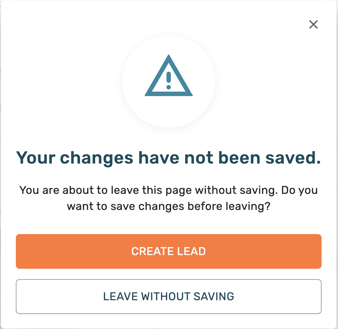
HEADS UP! Because lead capture is turned off and no contact information is provided, this quote will not be saved. If you attempt to leave the page, the platform will prompt you with a notification letting you know.
Options After Generating a Quick Quote:
- Save the quote. HIGHLY RECOMMENDED!
- Create a lead once the quote is generated to save it for future reference. This is considered best practice, even if you plan to send the quote immediately.
- Email the quote.
- Add the desired products to the cart,.
- Navigate to the cart and click "Email Details."
- The email address will default to your own, though it can be changed. A common practice is to email the quick quote to yourself for easy access.