
Requirements
- Roof Quote PRO™ active subscription
Overview
You must have measurement credits before placing an order for reports. Credits can be purchased directly from your RoofQuote PRO portal under your billing settings. Discounts apply when purchasing larger packages, and you can set up auto-renewal so you never run out.
NOTE: Measurement credits only apply to GAF® QuickMeasure™ and GeoSpan orders. If you use EagleView, credits are managed differently — see EagleView Integration for details.
Table of Contents
Purchase Credits
- Log in to your PRO portal and find the Profile icon.
- Choose Billing from the menu.
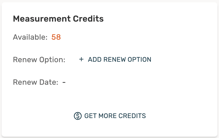
- Click Get More Credits under Measurement Credits.
- Select the amount of credits you wish to purchase.
- Complete checkout on the right using your payment method. You can use the same method as your subscription.
Credit Packages & Pricing
Below is the typical pricing you can expect (subject to updates):
| Package | Price | Effective Cost/Credit |
| 5 Credits | $100 | $20 / credit |
| 25 Credits | $475 | $19 / credit |
| 50 Credits | $940 | $18.80 / credit |
| 100 Credits | $1,850 | $18.50 / credit |
Set Up Auto-Renewal
To avoid running out of credits, you can set up automatic renewal:
- From the Measurement Credits section in your Billing page, click Add Renew Option.
- Choose how many credits you'd like to automatically renew.
- Select a renewal trigger:
- When credits are low — auto-renews when your balance reaches 3 or fewer credits.
- Custom date — choose a weekly or monthly renewal period and a specific day.
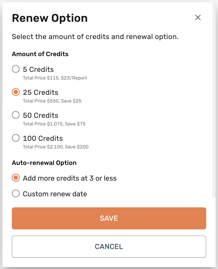
- Click Save.