
Requirements
RoofQuote PRO™ active subscription
Admin access
Overview
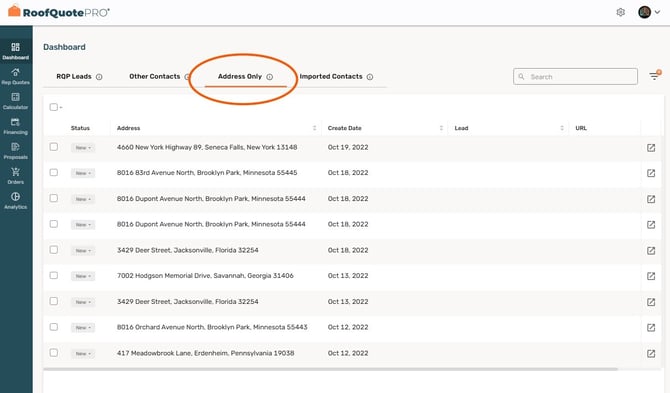
Address Only leads occur when a homeowner enters their address via the RoofQuote PRO widget, but does not submit further details (such as name, phone, or email).
These leads still show up in the Dashboard under the “Address Only” tab and indicate partial engagement. While not full contacts, they present an opportunity if handled smartly.
Why Do 'Address Only' Leads Happen?
These are the most common causes for address only leads and what they signal:
-
Early-stage curiosity or browsing
A visitor enters their address just to explore what happens next, then drops out. -
Form friction or multi-step drop-off
After the address, required fields or multi-step flows cause abandonment. - Fear of being spammed or having their information sold
Some users hesitate to submit personal contact details if they are unsure how the information will be used. Lack of trust, unclear privacy messaging, or previous bad experiences with online forms can cause them to stop at the address step. -
Low-intent traffic / mis-targeted ads
Visitors may be clicking ads, but aren’t seriously considering a quote. -
Inappropriate widget placement or unclear messaging
If the widget implies “just explore” but then asks for contact info, users may back out. -
Mobile or performance issues
Slower devices, smaller screens, or slow load times increase the chance of abandonment.
How to Reduce Address Only Leads
Here are actionable tactics to improve full-submission conversion:
- Add trust-building factors
Adding trust indicators like privacy statements, security badges, disclaimers, and clear expectations near the widget reassures users that their information is safe. - Social proof
Adding social proof, such as customer testimonials, star ratings, or trust badges throughout the website, increases credibility and encourages users to complete the full form. - Clear upfront messaging
Use a CTA that sets expectation: e.g., “Start your roof quote. Only takes 30 seconds” rather than ambiguous labels. -
Improve traffic quality
In your paid campaigns or SEO-driven traffic, focus on homeowner intent, correct geography, and relevant keywords. -
Optimize for mobile and speed
Ensure the landing page and widget load quickly on mobile; test across devices. -
Monitor patterns
Check whether certain traffic sources or campaigns yield more “Address Only” leads and adjust accordingly.
How to Approach Address Only Leads
Even without full contact info, you can treat these as potential warm opportunities:
-
Physical or localized outreach
Since you know the address: mail flyers, add to your canvassing route, drop yard signs in the area, or door-hangers referencing their interest. -
Educational follow-up contact
Frame your outreach like: “We noticed someone started the process for your address — here’s a free guide to roof replacement”. It is low-pressure yet relevant. -
Track for repeated submissions
If the same address later becomes a full lead, you’ll know to escalate.
Recommended Workflow
Because Address Only leads do not trigger notifications, we recommend adding a simple internal task or reminder to ensure they are reviewed consistently. Common approaches include:
-
Creating a recurring weekly task for your team to review the Address Only tab.
-
Assigning responsibility to a specific team member, such as an office admin or lead manager.
-
Adding an internal checklist item to monitor Address Only leads alongside new full leads.
- Setting up an integration to your CRM via webhook to automatically send Address Only leads into your CRM or workflow system. This allows your CRM to create tasks, reminders, or alerts anytime an Address Only lead comes in, removing the need to manually check the dashboard.
-
Using your CRM (if integrated) to set a recurring reminder to review and export Address Only leads each week.
This ensures no potential opportunities are missed and helps your team spot trends in drop-offs or traffic quality.
FAQ
Q: Do Address Only leads count as full leads?
A: Not until contact information is submitted—they’re considered “partial” leads.
Q: Is a high volume of Address Only leads bad?
A: Not inherently—it may simply reflect that your traffic is lower-intent. Use that as a signal to adjust messaging or targeting.
Summary
Address Only leads represent partial submissions: a homeowner entered their address but did not complete the form. They don’t count as full leads yet, but they still hold value. By optimizing messaging and form experience you can reduce their volume; and by implementing intelligent follow-up strategies you can turn many into full opportunities.